Layouts
A layout is the publishable arrangement of your IPTV channels. It controls which groups and channels appear in output and which EPG settings apply to them.
The setup relationship is:
Use a separate layout when different viewers need different channel groups, ordering, or output settings.
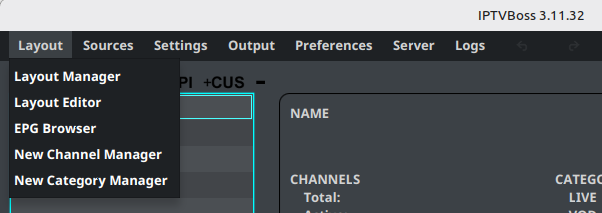
Open layout tools from the Layout menu at the top of IPTVBoss:
- Layout Manager creates layouts, controls their output settings, and reports layout health and inventory.
- Layout Editor organizes groups and channels inside a layout.
- EPG Browser checks programme data for mapped channels.
- New Channel Manager and New Category Manager control how new provider content is handled.
Continue with a layout
- Start with Managing layouts to create or select a layout.
- Use Editing a layout to organize groups and channels.
- Use Mapping channels to assign EPG data.
- Use Layout Output Settings to configure destinations and formats.
- Use Creating output to generate the files or links.
After a source sync or layout change, return to Layout Manager and review the selected layout’s health badge, unmapped live-channel count, missing-logo counts, empty groups, and output status before publishing output. See Read layout health for the attention checks and dashboard actions.
Free and Pro
Layout limits are listed only in the canonical Free vs Pro comparison. If you reach the current limit, remove an unused layout or review the available Pro plans.
To reuse content, choose linked groups for shared maintenance or layout file import/export for transfer between installations.