Dummy Guides and Inventory
Use a basic dummy for manually configured guide information, or an Advanced EPG Dummy for event matching and generated presentation. The inventory brings both types together.
Open the inventory
Available in 3.11.108 and later, the Dummy Guide inventory brings basic dummy channels and Advanced EPG Dummies (AEDs) together in one searchable table.
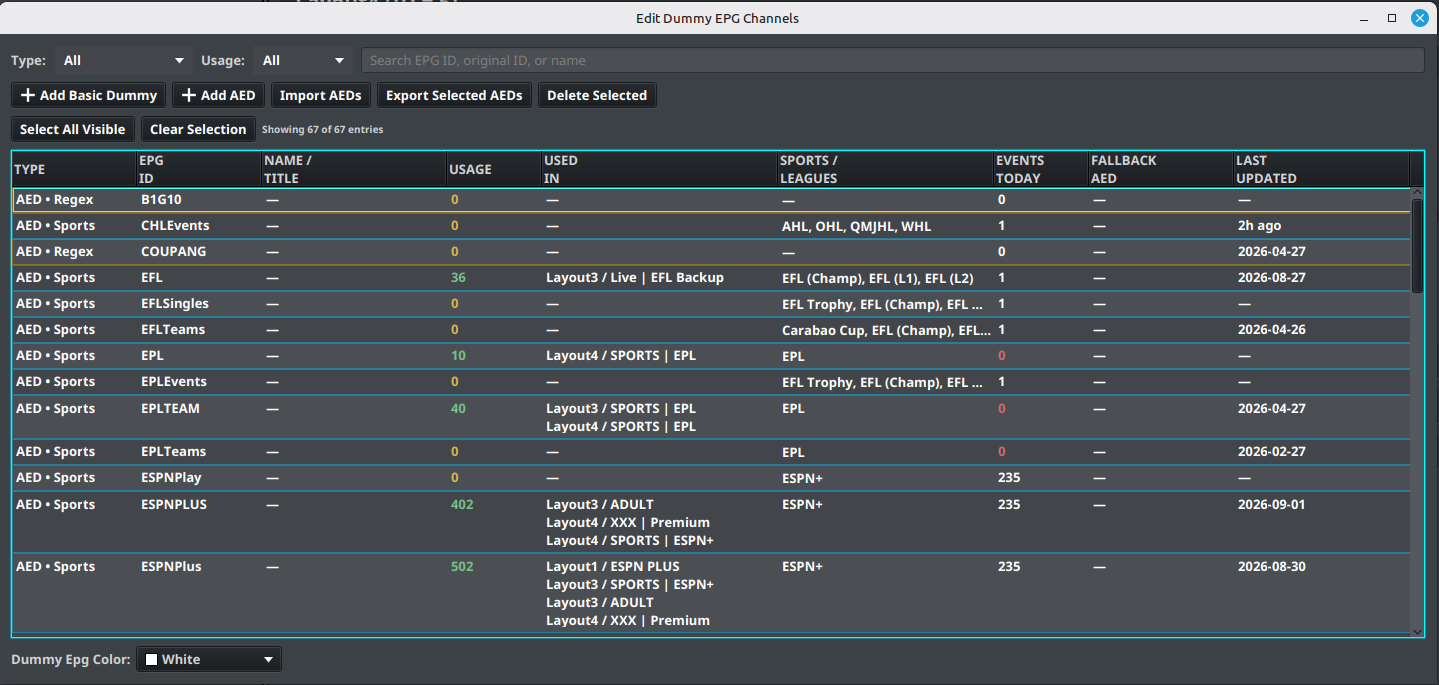
Open Sources → Dummy Guide Inventory, or select the built-in dummy source in EPG Sources and open EPG Settings. The window is titled Edit Dummy EPG Channels.
Find an entry
Use Type to show all entries, basic dummies, AEDs, or sports AEDs. Use Usage to show all, used, or unused entries. Search by EPG ID, original ID, or name; search and dropdown filters work together. The count above the table shows how many entries match.
The table shows each entry's type, EPG ID, name/title, usage count, and the layouts/groups where it is used. AED details also include sports/leagues, Events Today, Fallback AED, and Last Updated, where applicable. Double-click an entry to open its editor.
Create, edit, and manage entries
- Add Basic Dummy creates a basic dummy channel; Add AED opens the AED creation workflow.
- Import AEDs loads AED definitions from a file.
- Export Selected AEDs exports selected AED definitions. Basic dummy rows are excluded from AED exports.
- Select All Visible selects entries matching the current filters; Clear Selection clears the selection.
- Delete Selected asks for confirmation and reports how many selected entries are currently used by layouts. Review Used In before deleting: deleting a used entry can remove its EPG assignment from future output.
Review the source summary
In Sources Manager, the built-in dummy source also shows totals for basic dummies, AEDs, assigned and unused AEDs, sports AEDs, today's events, and Custom Sports groups and channels. Select Unused AEDs to open the inventory filtered to unused AEDs.