Server Console: Paired Devices
IPTVBoss Pro
XC Server requires Pro.
Use Paired Devices to generate a single-use pairing code, review connected clients, and revoke access for a device that should no longer reach the server. Pairing also provisions the client-specific credential that allows an IPTVBoss desktop installation to request an automatic server reload after its shutdown backup finishes.
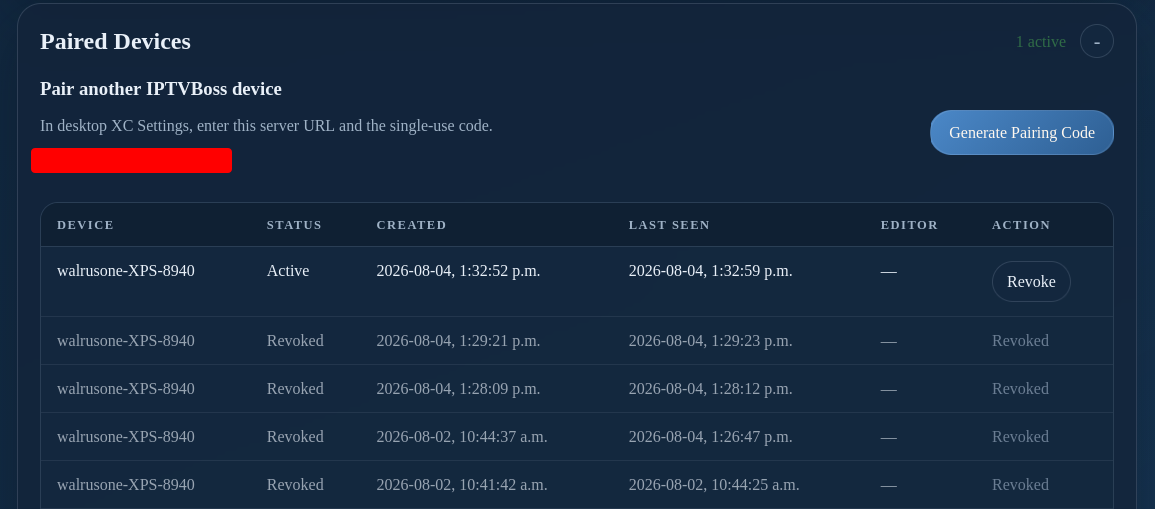
- Select Generate Pairing Code.
- Enter the displayed server URL and single-use code in the other IPTVBoss desktop installation's XC Settings.
- Wait for the device to appear in the paired-device table.
- Use Revoke for a device that should no longer connect.
The code expires and should be shared only with the intended device owner. The reload credential is limited to requesting a server reload; it does not grant general Server Console access. Revoking a device also revokes its reload credential and releases its editor lease when applicable. A revoked client can no longer trigger automatic reloads unless it is paired again.
For desktop setup, see Connect the Desktop. For a lost pairing, see paired-code recovery.
Treat pairing and recovery codes as temporary credentials; do not publish them. For the complete client-triggered workflow, see Automatic server reloads from this client.