Server Console: Server Settings
IPTVBoss Pro
XC Server requires Pro.
Use Server Settings in the web frontend to configure the public server address and synchronization schedules. Saving settings may push a fresh backup to the configured cloud provider.
- Enter the server address in Server URL.
- Review the listening port in Server Port.
- Enable Include Port in URL when the public address requires it.
- Review the displayed connection address.
- Select Save Settings.
Use an address reachable by paired desktop installations. Do not use localhost or 127.0.0.1 when another computer must connect.
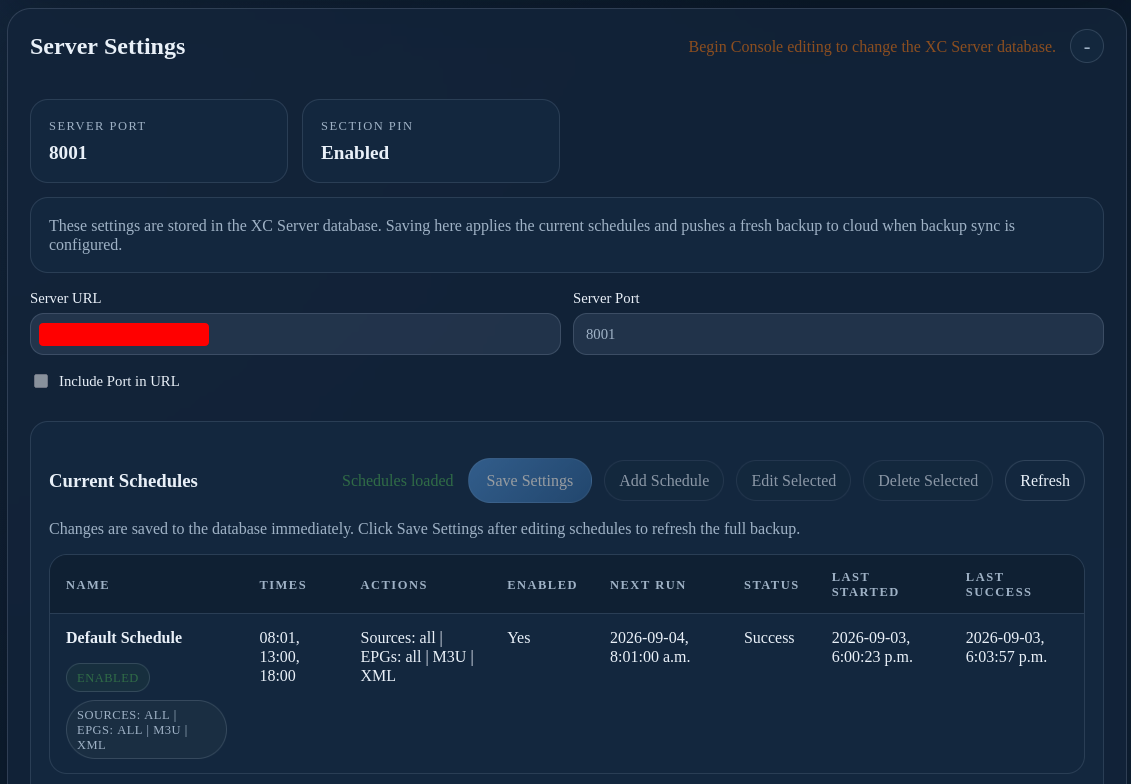
Current Schedules
- Select Add Schedule.
- Choose the required source, EPG, M3U, or XML synchronization actions.
- Choose the run times and enable the schedule.
- Select Save Settings.
- Confirm the schedule’s next run and status.
Use Edit Selected, Delete Selected, and Refresh only after confirming the intended schedule. Review the next run, status, last started time, last success, and run history after saving.