GUI Server Dashboard
IPTVBoss Pro
XC Server requires Pro.
The GUI Server Dashboard is the dashboard shown inside the desktop IPTVBoss application when the XC Server is enabled. Open it from the Server menu in the GUI.
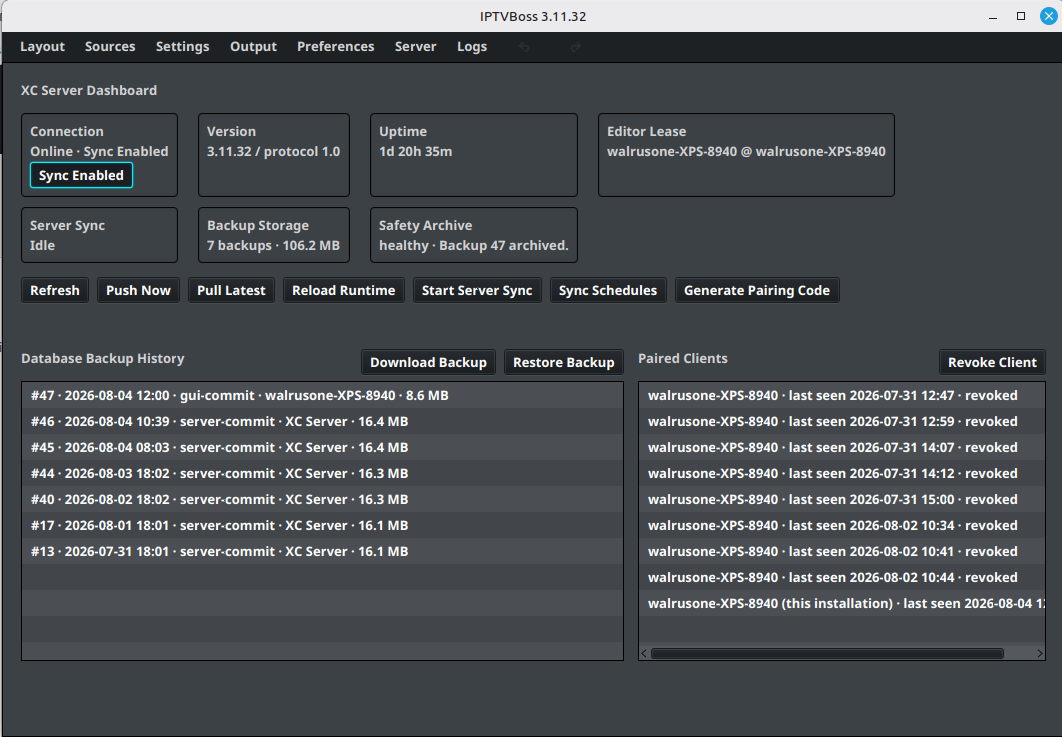
The dashboard provides a quick view of the server’s current state and controls for common server operations:
- Connection shows whether the server is online and whether synchronization is enabled.
- Version, Uptime, and Editor Lease identify the running server and the active editor connection.
- Server Sync, Backup Storage, and Safety Archive show synchronization and backup status.
- Refresh, Push Now, Pull Latest, and Reload Runtime refresh or reconcile server state.
- Start Server Sync and Sync Schedules control synchronization operations.
- Generate Pairing Code creates a temporary code for connecting another IPTVBoss installation.
- Database Backup History lists available backups and provides Download Backup and Restore Backup actions.
- Paired Clients lists connected installations and provides Revoke Client.
Review the connection, sync, and backup status before starting a server operation. A restore or push can affect the authoritative database and every paired installation.
For the browser-based administration interface, use the Server Console and its Console Sections.